Here’s a realization that took me embarrassingly long to reach: I was running separate Pinterest strategies for my digital products, my blog, and my freebie opt-ins — three different approaches, three times the effort, and none of them particularly cohesive.
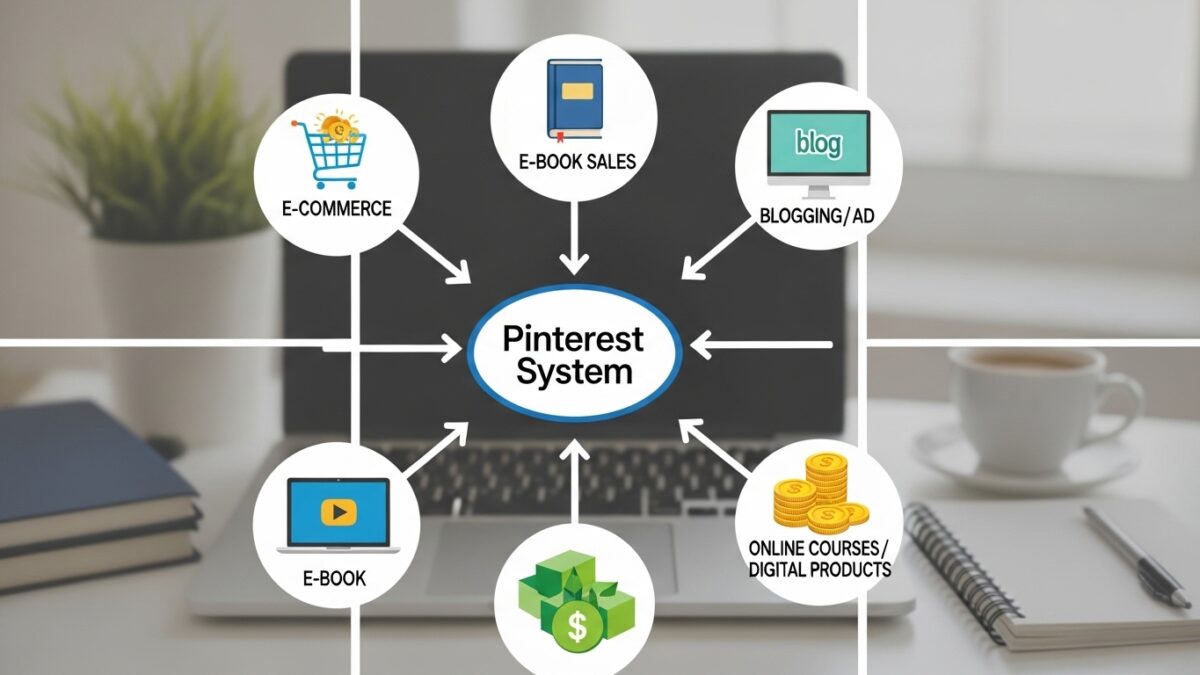
Then I stepped back and built one unified system. Not three. One. And it serves all three revenue areas simultaneously — because the traffic flow naturally routes people to different things depending on where they are in their buyer journey.
Let me break down how this actually works, because the architecture is simpler than it sounds.
Don’t build separate strategies for separate income streams. Build one system that routes traffic to all of them.
The Multiple Income Streams Worth Building Around Pinterest
Before getting into the strategy, let me be clear about what I mean by multiple income streams in a digital business context — and what’s realistic to build with Pinterest as your traffic source:
Income Streams That Work Well With Pinterest Traffic
- Digital products — planners, templates, guides, printables sold on Etsy or Gumroad
- Blog monetization — display ads (Google AdSense or Mediavine) on blog posts that Pinterest drives traffic to
- Affiliate marketing — recommending tools you genuinely use (promoted to your email list)
- Digital courses or workshops — higher-ticket offers promoted to warm email subscribers
- PLR content packages — private label rights products sold to other creators
The key insight is that Pinterest doesn’t need to directly convert for every income stream. For some streams, Pinterest drives the initial traffic. That traffic joins your email list. The email list is where affiliate recommendations, courses, and higher-ticket products get sold.
The Traffic Flow That Connects Everything
Here’s the architecture in simple terms: Pinterest pin → Blog post or landing page → Email signup → Email sequence → Multiple purchase opportunities.
A single person can enter this system at any point and exit at any income stream. Someone who clicks a product pin might buy immediately — that’s your direct product revenue. Someone who clicks a blog pin might read the article, sign up for your freebie, receive your email sequence, and buy a higher-ticket course two weeks later — that’s affiliate and course revenue triggered by the same Pinterest traffic.
One traffic source. Multiple monetization points. That’s the architecture worth building.
Create Pins That Feed Your Entire Funnel
PinCraft AI’s Batch Generator processes up to 20 URLs at once — product pages, blog posts, and landing pages — generating optimized content for each. Try free.
Using PinCraft AI Across All Stream Types
What makes this manageable is having one tool that creates content for all your stream types in one session. Here’s how I use PinCraft AI across each:
For digital product pins: I use the Mockup Studio to create lifestyle images of my products in scenes like ‘Cozy Morning’ or ‘Coffee Shop.’ The Typography Engine layers crisp, readable text on top. These go directly to product landing pages.
For blog traffic pins: The Batch Generator handles these efficiently. I input up to 20 blog post URLs at once, and it generates titles, SEO descriptions with 5-7 keyword suggestions each, and image prompts for all of them simultaneously. The tone control lets me set ‘Friendly & Engaging’ for lifestyle content and ‘Direct & Sales-Focused’ for product content.
For lead magnet pins: Same Batch Generator process, but the destination URLs point to my opt-in landing pages. The Spin Technology lets me generate multiple headline variations for each page — different angles, different emotional hooks, reaching different searchers.
PinCraft AI Tone Control Options
- Friendly & Engaging — Best for lifestyle content, mom blogs, and community-focused niches
- Direct & Sales-Focused — Best for e-commerce, product pages, and direct response
- Witty & Humorous — Best for entertainment, pop culture, and playful brand voices
Managing Multiple URLs With the Smart Scheduler
When you’re pinning for multiple income streams, you’re working with a lot of URLs — blog posts, product pages, opt-in pages, affiliate landing pages. Keeping track of which ones have been recently pinned, which ones need new content, and which are in their cooldown period gets complex fast.
PinCraft AI’s Smart Scheduler and 7-Day Safety Valve manages this automatically. The status dashboard shows which URLs are ready for new pin content and which are in their cooldown period. You can import your entire website’s sitemap to populate the inventory instantly. The system tracks everything so you don’t have to maintain a manual spreadsheet.
💡 Quick Tip
If you’re running multiple income streams, set up separate ‘boards’ for each category in your scheduling tool. Product pins, blog pins, and lead magnet pins to different boards. Pinterest’s algorithm responds well to organized, topic-specific boards.
Create Content for All Your Income Streams in One Session
PinCraft AI processes up to 20 different URLs at once — product pages, blog posts, opt-in pages — generating optimized pin content for each. Try free at buy.pincraftai.com.
Building a multi-stream income system sounds complicated, but the architecture is straightforward: one traffic source (Pinterest), one funnel (Pinterest → blog/landing page → email), and multiple things to sell at the end of that funnel. Use PinCraft AI to create content for all your URLs efficiently in one weekly session, and let the system route traffic to the right income stream automatically.
Ready to Get Started?
Try PinCraft AI free today — no credit card, no commitment, just faster and smarter Pinterest content creation.
Try PinCraft AI Free Today
Design beautiful Pinterest pins in seconds with AI. Start your free trial — no credit card needed.

Helping creators use AI tools and Pinterest to build digital product income from home.