⚡ QUICK ANSWER: You can create scroll-stopping, text-on-image Pinterest pins using Ideogram’s AI image generator — no design experience needed. Pair it with Canva’s Magic Studio to fine-tune fonts and colors, and you’ve got a Pinterest-ready pin in under 20 minutes. It’s one of the simplest ways to start driving traffic to your blog and digital products.
Okay, real talk — if you’ve been spinning your wheels on Instagram or TikTok wondering why the views just won’t convert, you are so not alone. There’s a quieter, slower-burn platform out there that rewards consistency over virality, and it actually sends buyers to your products. That platform is Pinterest. And the secret weapon most people are sleeping on? An AI image tool called Ideogram — and ngl, once you see what it can do, you’ll wonder why you didn’t find it sooner.
This post breaks down exactly how to use Ideogram to create Pinterest pins that promote your blog and, through your blog, your digital products. No big budget. No design degree. Just a smart tool, a little creativity, and a strategy that actually makes sense.
Here’s what we’re covering: what Ideogram is and why it’s perfect for Pinterest, a step-by-step walkthrough to create your first pin, how to polish it in Canva, and the simple blog funnel that turns pin views into product sales.
📺 More of a watcher than a reader? Totally valid — the full video is right here: [Watch on YouTube →]
The Pinterest Pivot — Why This Platform Hits Different for Digital Product Sellers
If you’ve put real effort into TikTok or Instagram and felt like you were shouting into the void, the problem probably isn’t your content. It’s the audience match. Both platforms lean heavily on entertainment and trend cycles, and unless you’re going viral (which, let’s be honest, is mostly luck), organic reach for product-based content is brutal.
Pinterest is a different world. People go there with intent — they’re searching, planning, researching. They want ideas, tutorials, and resources. And when your content shows up as the answer to what they’re already looking for? That’s a warm audience. That’s someone much closer to buying.
The other thing that makes Pinterest worth investing in — pins have a long shelf life. A TikTok can be dead in 48 hours. A Pinterest pin can drive traffic for months, sometimes years. That’s the kind of marketing that works around your life, not just when you’re actively posting.
What Is Ideogram and Why Is It Perfect for Pinterest Pins?
Ideogram is a paid AI image generator — but here’s what makes it stand out from the crowd: it’s genuinely good at text on images. Like, actually readable, well-placed, aesthetically pleasing text. If you’ve tried other AI generators for anything with words on it, you know how painful the results can be. Ideogram was practically built for this.
For Pinterest specifically, this is huge. Pins with clear, bold text overlays consistently outperform purely visual ones because they communicate value instantly — a reader scrolling fast knows exactly what they’re getting before they even click.
Ideogram is available on a monthly subscription, and you can try it out before committing to see if it fits your workflow. Once you’re in, you can generate images, choose aspect ratios, select color moods, upload your brand colors, and use their latest model (currently 2.0). For anyone creating pins regularly, it’s genuinely worth the investment.
Step-by-Step: Creating a Pinterest Pin with Ideogram
Here’s how the whole thing comes together.
Step 1: Get Your Prompt from ChatGPT First
Before opening Ideogram, pop over to ChatGPT and ask it to write you a Pinterest pin description. Give it your blog post title and a few keywords, and ask for a short, vivid prompt that includes the pin title, mood, and visual style.
This matters because Ideogram responds beautifully to specific, well-crafted prompts — and ChatGPT is fast at writing those. You’re essentially using two AI tools as a team, and they play very well together.
✨ FRIEND TIP: Ask ChatGPT to write the Ideogram prompt in image-generation style — describing the scene, lighting, color palette, and text to include. The more specific the prompt, the better Ideogram’s output. Vague prompts get vague results.
Step 2: Set Up Your Ideogram Settings
Once you’re in Ideogram, paste your prompt into the generator. Here’s what to set before you hit generate:
- Magic Prompt: Leave this on — it enhances your prompt automatically
- Aspect Ratio: Choose 9:16 for a standard Pinterest vertical pin
- Visibility: Set to public or private depending on your preference
- Model: Select the latest version (2.0 at time of writing)
- Color Palette: This is where it gets fun — choose a mood that fits your content. Pastel for lifestyle content, muted tones for professional topics, or deeper, richer palettes for niche themes like seasonal content.
Then click generate and watch it work. Ideogram typically gives you several variations at once, so you’ll have options to pick from.
Step 3: Download Your Favourite Version
Scan through the generated options and pick the one that best fits your brand aesthetic and blog topic. Download it as a JPEG — you’ll bring this into Canva next for any final touches.
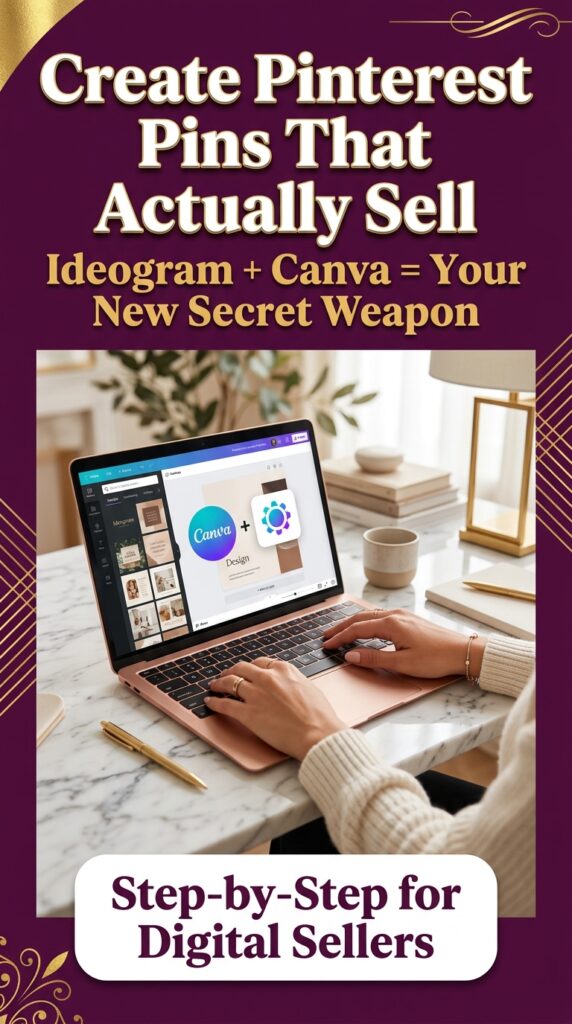
IMAGE 1 📌 Prompt: A warm, bright home office scene featuring a young woman sitting at a clean white desk, looking at a laptop screen with a satisfied expression. Soft morning window light streams in from the left. On the desk: a mug of coffee, fresh white flowers in a small vase, a rose gold laptop, and a printed Pinterest mood board. Color palette: warm whites, blush, and soft sage. Shallow depth of field. Editorial lifestyle photography style, Pinterest-perfect aesthetic. 🖼️ Alt Text: Woman creating Pinterest pins on laptop in cozy bright home office workspace 📍 Placement: Below the “Step-by-Step” section header
Polishing Your Pin in Canva with Magic Studio
Here’s the part that takes a good pin and makes it a great one.
Once you’ve uploaded your Ideogram image to Canva, open it in a new design. For Pinterest, you can use the standard Pinterest pin size (1000 x 1500px), or if you want cross-platform versatility, the TikTok/Instagram Reels ratio works well too.
Using Magic Grab to Edit Text
This is the Canva feature that makes this workflow genuinely slick. Select your image, go to Edit → Magic Studio → Magic Grab (Text), and Canva will detect and isolate the text from your image so you can edit it directly.
From there you can:
- Change font styles to match your brand
- Adjust font sizes for better hierarchy
- Swap text colors so key words pop (white, gold, and bold contrast colors tend to perform well on Pinterest)
- Move text elements around for better composition
You can also use Magic Grab on image elements — isolating specific objects in the image to reposition or remove them. It’s genuinely impressive what Canva’s AI can do here.
✨ FRIEND TIP: When editing pin text in Canva, aim for one big focal word or number and one supporting line beneath it. Think “5 Ways to…” or “Earn More From Your Blog” — short, punchy, and immediately clear about the value. Pins don’t have time for paragraphs.
The Blog Funnel: How Pins Actually Lead to Product Sales
Here’s the strategy piece that ties everything together — and honestly it’s the part that changes everything once you see how it works.
The pin doesn’t sell your product directly. The pin promotes your blog post. The blog post delivers genuine value, builds trust, and then introduces your product naturally — as a helpful next step, not a hard sell.
So the flow looks like this:
Pinterest Pin → Blog Post → Product Sale
This matters because cold traffic (someone who’s never heard of you) needs a warm-up. A pin saying “Buy my digital product!” gets ignored. A pin saying “5 Easy Digital Products You Can Make This Weekend” gets clicked — because it promises something useful. The blog post delivers on that promise. And somewhere in that post, when trust is established, your product becomes the obvious, welcome next step.
This is also why blogging is such a smart long-term play. Your blog posts can rank on Google and get pinned on Pinterest, creating multiple traffic streams to the same content. Add an ad network to the mix once you hit traffic thresholds, and your blog becomes an income source in its own right — separate from product sales entirely.
IMAGE 2 📌 Prompt: Flat lay image on a white marble surface featuring a open rose gold laptop showing a Pinterest board, a small notebook with handwritten strategy notes, a cup of matcha, and delicate dried flowers. Soft diffused daylight from above. Neutral tones with blush and sage accents. Clean editorial product photography feel, very Pinterest-worthy and aspirational without feeling unattainable. 🖼️ Alt Text: Pinterest marketing strategy flat lay with laptop notebook and matcha on marble desk 📍 Placement: After the Blog Funnel section
Stop the Content Blank-Stare: How to Never Run Out of Pin Ideas
Okay, here’s the thing nobody talks about — creating one great pin is satisfying. Creating consistent pins for the same product, week after week, without repeating yourself or going completely blank? That’s where most people quietly give up.
This is exactly the problem PinCraft AI was built to solve. It’s a Pinterest pin generator made specifically for printable and digital product sellers — Etsy sellers, TPT sellers, bloggers — who want steady Pinterest traffic without the daily “what do I even post today?” spiral.
What makes it genuinely different is that it generates multiple pin angles for the same product so you’re not saying the same thing five times in a row. It also has a markup generator built in and keeps updating as long as you’re subscribed. You get a unique access key after purchase, and you can cancel anytime.
Tbh — if Pinterest consistency is the goal and decision fatigue is what’s been stopping you, this is the kind of tool that removes the friction between “I should post” and “I actually posted.” It’s built for sellers who already know their products are good; they just need help with the steady drumbeat of content that gets those products found.
✨ FRIEND TIP: PinCraft AI is especially useful once you’ve built even a small product library. Instead of creating one pin per product and moving on, you can generate 5–10 different angles — different hooks, different benefits, different audiences — so each product gets real exposure over time, not just one shot.
Imagine sitting down for two hours on a Sunday and creating three blog posts from videos you’ve already made — using AI to help draft the content, Ideogram to create the pins, and Canva to put the final touches on. You schedule those pins to go out over the next two weeks and go back to your normal week.
That content keeps working. Pinterest users discover your pins days, weeks, even months later. They click through to your blog, read something genuinely helpful, and find their way to your product — your digital download, your template, your starter kit. A sale comes through on a Thursday morning while you’re making coffee.
That’s the quiet power of this approach. It’s not fast, and it’s not flashy, but it builds something real. Bloggers who monetize through both products and ad networks often find that Pinterest becomes their number one traffic driver — not because they’re grinding daily, but because they’ve built a library of content that compounds over time.
✨ FRIEND TIP: If you’re just getting started, don’t try to build a blog and master Pinterest simultaneously from scratch. Pick one video you’ve already made (or one topic you know well), use AI to help draft the post, and create just one good pin to go with it. Proof of concept first. Then scale what works.
Just a heads up — some links here are affiliate links. If you grab something through my link, I may earn a small commission at no extra cost to you. I only ever share things I genuinely use or love. ✨
If you’re ready to start selling your own digital products, the Digital Business Starter Kit is worth a look — it’s designed for people who want to get moving without the overwhelm of figuring everything out from scratch. It walks you through the whole setup in a way that actually makes sense.
And if you want a real conversation about your specific situation — what to sell, where to focus, how to structure your funnel — you can book a 1-on-1 consultation call. Honestly, sometimes a single conversation can save you months of guessing.
Wrapping Up — You’ve Got More Than You Think
If you made it here, you now understand something a lot of people are still figuring out: the real opportunity isn’t just selling products one at a time on social media — it’s building an ecosystem. A blog that works while you sleep. Pins that bring in warm traffic. Content that compounds.
The three big takeaways from all of this:
- Ideogram is genuinely excellent for creating text-on-image Pinterest pins — use ChatGPT to craft your prompt first for best results.
- The blog funnel is the strategy — your pin drives traffic to a post, the post builds trust, and the post converts to sales.
- Canva’s Magic Studio makes it easy to customize AI-generated images without needing a designer’s eye.
- PinCraft AI takes the guesswork out of staying consistent — multiple angles for the same product, no repeating yourself, no daily blank stare.
None of this requires a big budget or a big following. It requires showing up consistently, creating helpful content, and letting the platform do its slow, steady, powerful thing.
Whenever you’re ready to take the next step, here’s what’s available: the Digital Business Starter Kit to get your foundation set up, PinCraft AI to keep your Pinterest content consistent without the daily grind, and a 1-on-1 consultation call if you want personalized guidance on your specific situation. No rush — this is a long game, and you’re already further along than you think. 💛
❓ Frequently Asked Questions
Q: Does Ideogram cost money? A: Yes — Ideogram is a paid tool available on a monthly subscription. It’s not the cheapest option out there, but for anyone creating Pinterest pins regularly, the quality of text-on-image output makes it worth it. The results look polished and intentional in a way that free generators often don’t match.
Q: How do I write a good prompt for Ideogram? A: Use ChatGPT to help you! Give it your blog post title, target audience, and color preferences, and ask it to write an Ideogram-style image prompt. Include specific details: the text you want on the pin, the mood, the color palette, and the setting. Specific prompts consistently outperform vague ones.
Q: Is Canva Magic Studio free to use? A: Some Magic Studio features are available on Canva’s free plan, and others require Canva Pro. Magic Grab (the text extraction feature covered here) is part of the Pro offering — but Canva Pro is relatively affordable, and the time it saves on pin editing makes it very worth it for anyone creating content regularly.
Q: Will Pinterest work for digital product sellers who are just starting out? A: Honestly, yes — and sometimes more effectively than Instagram or TikTok for new creators. Pinterest rewards relevance over follower count, which means a brand new account with genuinely helpful content can still get found. The key is consistency and keyword-optimized pin titles and descriptions.
Q: What is PinCraft AI and is it worth it for Pinterest sellers? A: PinCraft AI is a Pinterest pin generator built specifically for Etsy, TPT, and digital product sellers. It helps you generate multiple pin ideas for the same product so you’re not stuck repeating the same angles — which is one of the biggest consistency killers on Pinterest. It also includes a markup generator and ongoing updates with your subscription. If you’ve ever stared at a blank screen wondering what to pin next, it’s genuinely worth trying. Check it out here → A: Real talk — it’s a slower build than viral social media. Most creators see meaningful traffic growth between three and six months in. The upside is that unlike a TikTok that dies in two days, a well-made Pinterest pin and blog post can drive traffic for years. It’s a long game, but the compounding effect is very real.
Try PinCraft AI Free Today
Design beautiful Pinterest pins in seconds with AI. Start your free trial — no credit card needed.

Helping creators use AI tools and Pinterest to build digital product income from home.