Have you seen those invitations where you tap a wax seal, the envelope opens, and the whole invite slides up on your phone? They’re called interactive digital invitations, and they’re all over TikTok right now for weddings, birthdays and Christmas parties.
I wanted to know one thing: can you make one with AI, with no coding and no design skills? So I tried it with Claude AI. In this post I’ll show you exactly how I made two of them, an elegant wedding invitation and a Christmas party invitation, with the exact prompt I used, a free RSVP form, and two simple ways to sell them.
Jump to:
- What is an interactive digital invitation?
- Why these invitations are selling right now
- Step 1: Paste the prompt into Claude
- Step 2: Turn it into a Christmas party invitation
- Step 3: Make a free RSVP form in Google Forms
- Step 4: Share the invitation (and test it)
- 2 ways to make money with interactive invitations
- FAQ
What Is an Interactive Digital Invitation?
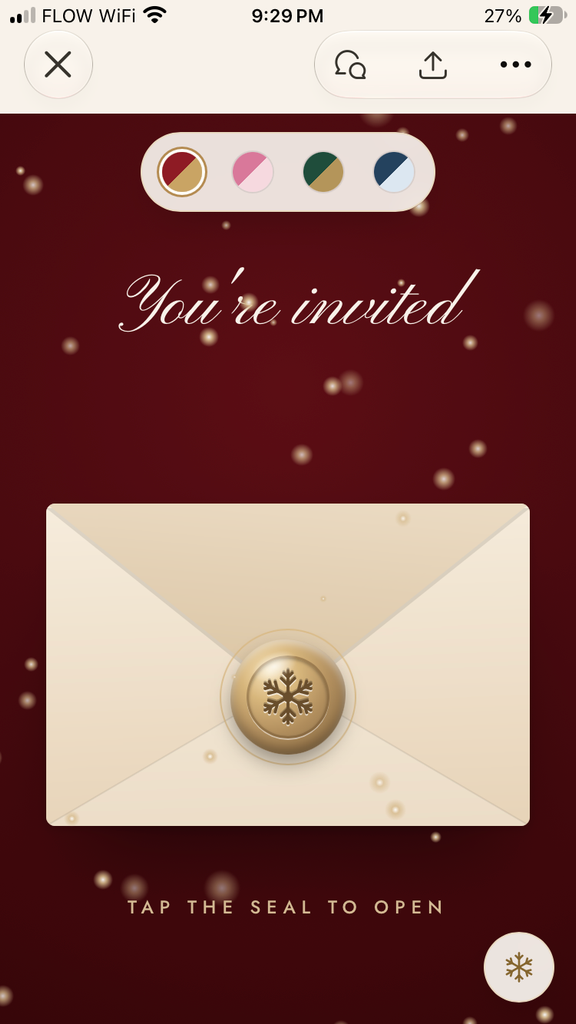
An interactive digital invitation is a small, mobile-friendly web page that works like a real invitation. Instead of a flat image or PDF, your guests get one link. They tap it, tap the seal, and the envelope opens to show the invite.
As they scroll, they see everything they need in one place:
- The names and the date, beautifully styled
- A live countdown to the event
- Ceremony and reception details with “Get directions” buttons that open Google Maps
- The schedule for the day, dress code, hotel and travel info
- A registry button and a short FAQ
- An RSVP button, plus a QR code you can print on paper cards
The host texts the link to their guests, and that’s it. No printing, no postage, and they can update the details later.
Why These Invitations Are Selling Right Now
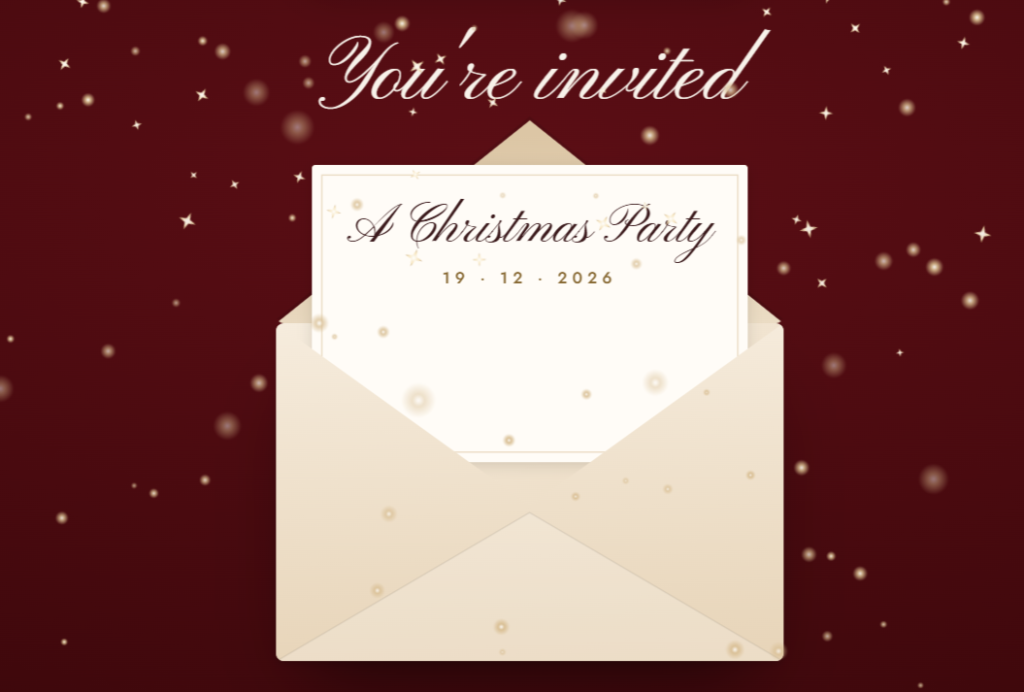
People love watching that envelope open. It looks special, it’s easy to share, and it feels more personal than a group text. You’ll see sellers offering them for weddings, birthdays, baby showers and holiday parties.
A lot of sellers on social media say they’ve made thousands from these. I can’t verify those numbers, but the demand is clearly there: search “interactive invitation” on TikTok and you’ll see creator after creator showing them off.
💡 Pro tip: Every invitation you make is also content. Screen-record the envelope opening on your phone and post it. That short clip is the best ad you’ll ever make for this product.
Step 1: Paste the Prompt Into Claude
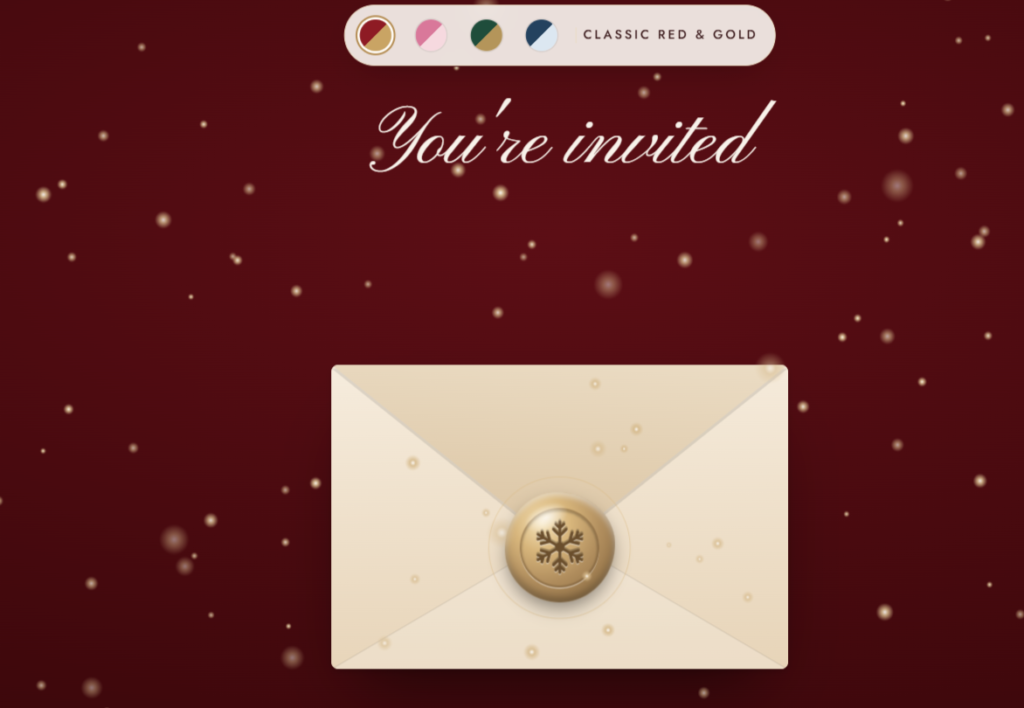
Open Claude in a new chat, paste in the prompt below, and press send. That’s genuinely all I did. Claude writes the whole page and shows it to you in a live preview. I didn’t write a single line of code.
Here’s the exact prompt I used for the wedding invitation. The names and details are made up, so swap in your own:
Build me a breathtaking, luxury interactive wedding invitation as a single mobile-friendly web page. It should feel like a high-end paper invitation from a boutique stationery studio: soft, romantic, elegant and calm, with lots of white space.

STYLE
- Colours: pearl background #F6F1EE, ivory cards #FFFDFB, deep plum text #352631, champagne gold accents #A9865A, soft gold lines #E7D8C4, a touch of sage #8E9C8A.
- Fonts (Google Fonts): Pinyon Script for the couple's names and a few headings only, Cormorant Garamond for body text, Jost in small uppercase with wide letter spacing for labels.
- Thin gold divider lines with a tiny diamond in the middle between sections.
- Rounded pill-shaped buttons. Gentle fade-in as each section scrolls into view. No clutter, no emoji.

SECTIONS, TOP TO BOTTOM
1. Opening: a realistic closed envelope in blush paper with a pointed flap and a glossy gold wax seal stamped "A J". Above it: "You're invited". Below it: "Tap the seal to open". When the seal is tapped, the flap folds open, a card slides up reading "Amelia & Jordan" and "06 · 12 · 2027", soft gold sparkles drift down, then the page scrolls smoothly to the invitation.
2. Hero: "Together with their families" / "Amelia" / "and" in gold italic / "Jordan" / "request the pleasure of your company as they celebrate their marriage" / Saturday, 12 June 2027 / Four o'clock in the afternoon / Rosewood Gardens, Charleston, South Carolina.
3. Countdown: live days, hours, minutes and seconds until 12 June 2027 at 4:00 PM, in large elegant numbers.
4. Our story: two photo spots side by side, then: "We met over a borrowed umbrella on a rainy Tuesday in 2019. Six years, two cities and one very patient dog later, Jordan asked the question on that same street corner."
5. The details: Ceremony at 4:00 PM, Rosewood Gardens, 218 Magnolia Lane, Charleston, SC. Reception at 6:00 PM, The Glass Pavilion, steps away on the garden lawn. Each with a "Get directions" button linking to Google Maps.
6. The day: a timeline with times on the left. 3:30 PM Guests arrive, welcome drinks in the garden. 4:00 PM Ceremony. 5:00 PM Cocktail hour and photos. 6:00 PM Dinner and toasts. 8:00 PM First dance and dancing. 11:00 PM Sparkler send-off.
7. Dress code: "Garden formal" in script, "Soft, neutral tones are welcome. The ceremony is on grass, so block heels are your friend.", and four small colour circles: blush, sage, champagne, mauve.
8. Stay and travel: "A room block is held at The Harbor Inn until 1 May 2027. Mention Amelia & Jordan when booking. Nearest airport: Charleston International (CHS), 20 minutes away."
9. Registry: "Your presence is the greatest gift. If you'd like to give more, our registry is here." with a "View registry" button.
10. Questions: an FAQ that opens and closes. Can I bring a plus-one? Are children welcome? Is there parking? What if it rains?
11. RSVP: a deep plum section with "Will you join us?" in script, "Please respond by 15 April 2027", and a champagne gold "RSVP now" button.
12. QR code: a QR code linking to this page, with "Scan to open".
13. Footer: "With love · Amelia & Jordan · 2027".

Make it look finished and expensive, like something a couple would proudly send to their guests.
Don’t like something? Just tell Claude, the same way you’d talk to a designer: “Make the envelope bigger and add a soft shadow”, “Use different colours”, or “Remove the registry section”. It updates the invitation in the same chat.
💡 Pro tip: Claude can take a little while on a design this detailed. Be patient and let it finish before you ask for changes.
Step 2: Turn It Into a Christmas Party Invitation
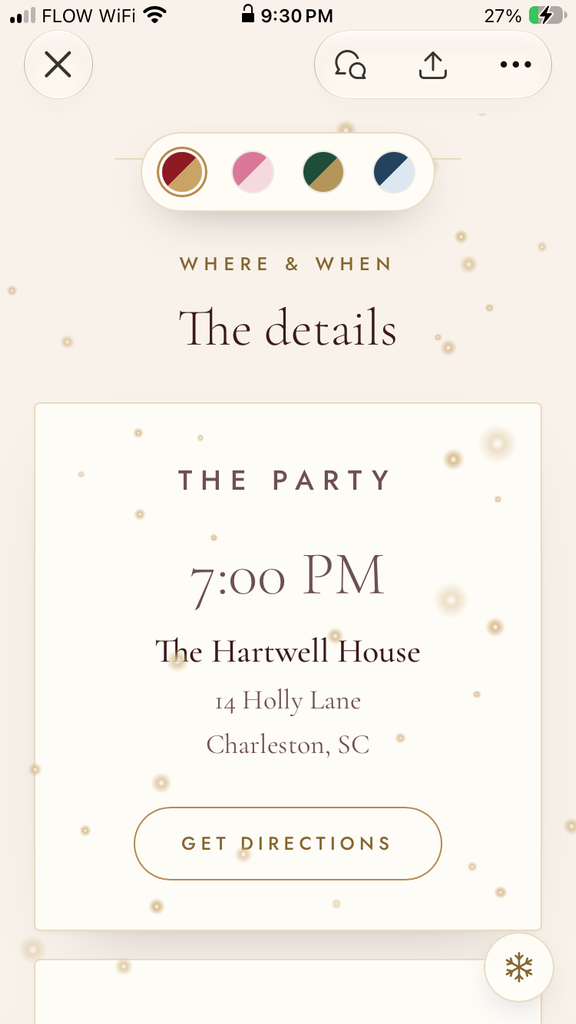
Here’s where it gets fun. In the same chat, you can turn the wedding invite into a completely different event. I typed this:
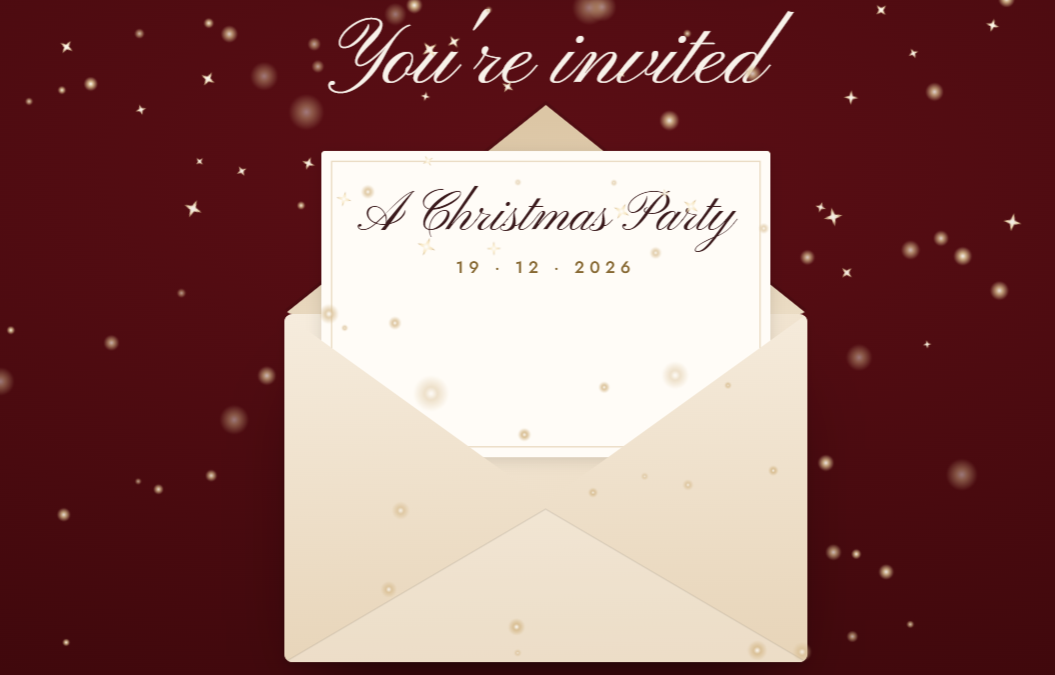
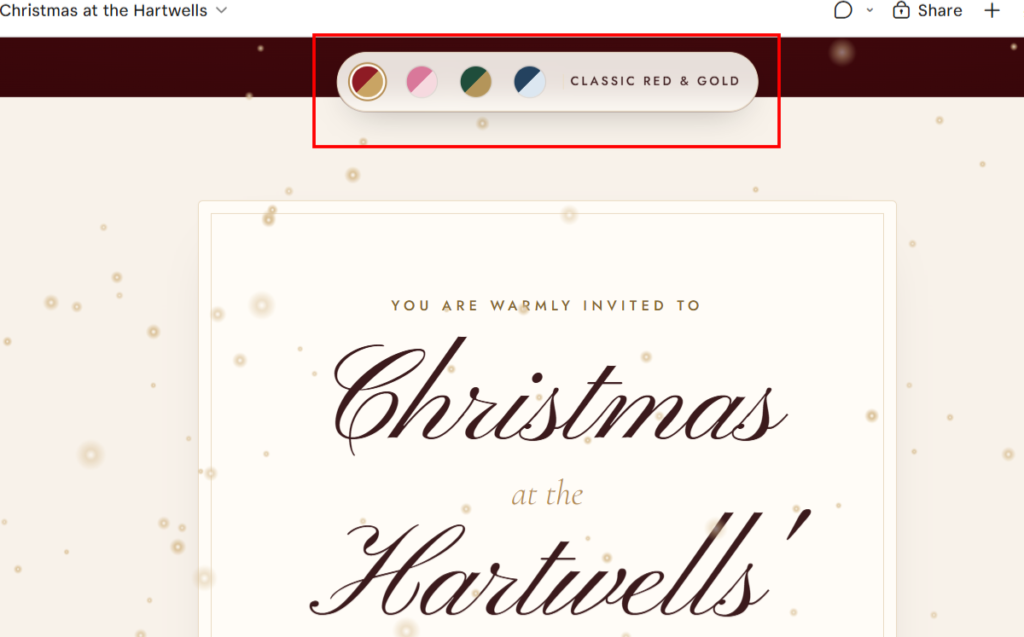
Now make a Christmas party version with falling snow, a snowflake seal, a Secret Santa section and a festive dress code. Add a style picker at the top so I can switch between four colour styles: classic red and gold, pink Christmas, evergreen and brass, and winter frost.
Claude rebuilt it with falling snowflakes and a style picker at the top, so you can switch between four looks:
- Classic red and gold: timeless and cosy (my favourite)
- Pink Christmas: soft and trendy, it’s everywhere right now
- Evergreen and brass: rich and elegant
- Winter frost: icy and pale, and it works for New Year’s too
This is honestly my favourite part, because if you’re not a design person, it teaches you which colours go together.
💡 Pro tip: Stick to three colours: one main colour, one accent and a light background. Use gold only for small details. That’s what makes an invitation look expensive.
Step 3: Make a Free RSVP Form in Google Forms
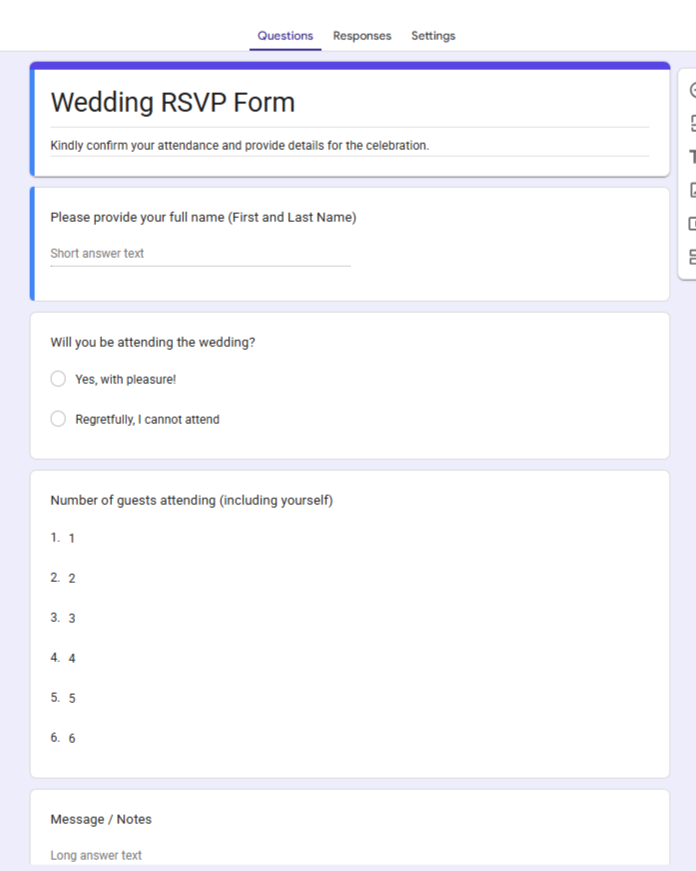
For the RSVP, I use a free Google Form. Every reply lands in a Google Sheet automatically, so the host sees their whole guest list in one place.
- Go to forms.google.com and click Blank form.
- Describe the form you want, or add the questions yourself: Name, Will you attend? (yes or no), Number of guests and a message box.
- Open the Responses tab and link it to a Google Sheet.
- Click Publish and set responders to anyone with the link. You must publish before you can get the link.
- Copy the form link.
- Go back to Claude and say: “Link the RSVP button to this form”, then paste the link.
Claude connects the button for you. Scroll down your invitation and tap RSVP to test it.
💡 Pro tip: Keep the form simple. Guests answer a four-question form in seconds. You can always style it later to match the invitation.
Step 4: Share the Invitation (and Test It First)
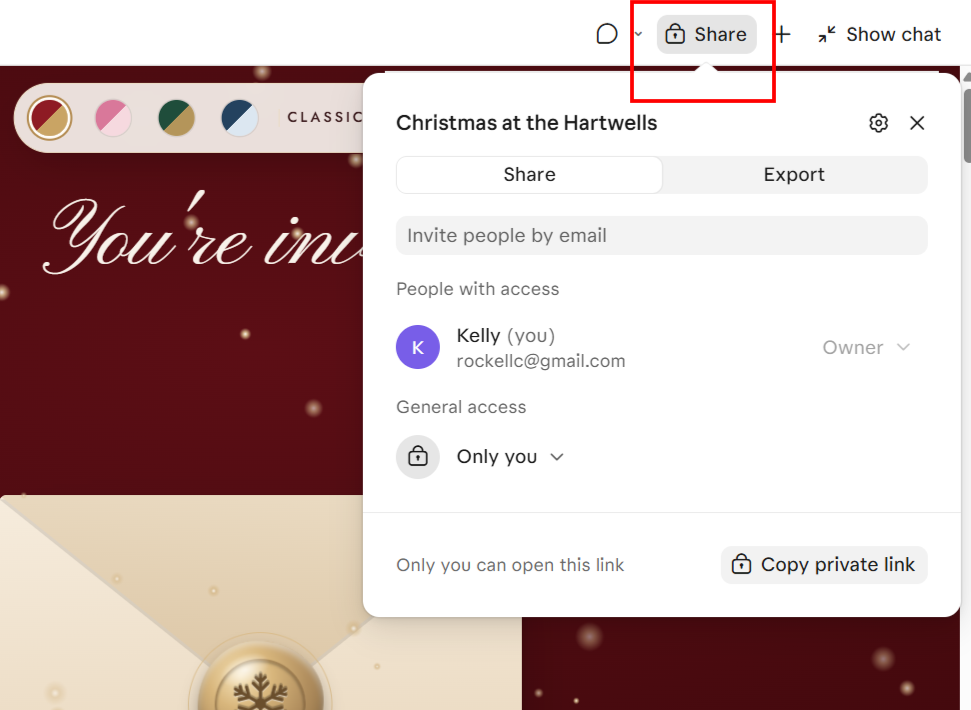
To send the invitation to guests, use the Share button in Claude to get a link, and make it available to anyone with the link.
Before you send it to anyone, open the link on a phone that isn’t logged in to Claude. That’s exactly what your guests will see, so check that the envelope opens, the countdown runs and the RSVP button works.
2 Ways to Make Money With Interactive Invitations
If you want to turn this into a little business, there are two simple ways to do it.
1. Make custom invitations for people
Customers send you their details (names, date, venue, colours), you make the invitation in Claude, set up their RSVP form, and send them the link. This is the easiest place to start because the customer doesn’t have to do anything.
- Best for: weddings, milestone birthdays, baby showers, holiday parties
- Good to know: make one RSVP form per customer, so their replies go to their own sheet
2. Sell the prompt and colour styles as a template
Package your prompt and your favourite colour styles so buyers can make their own invitations. You make it once and sell it many times.
- Best for: people who like DIY and want to save money
- Good to know: include clear instructions and an example, so buyers get a result they love
Either way, post every invitation you make. Short videos of the envelope opening do really well on TikTok, Instagram and Pinterest, and they bring buyers straight to you.
💡 Pro tip: Prefer a template your buyers can edit themselves? Canva is great for that. I show you how to make digital invitations in Canva on my YouTube channel.
Frequently Asked Questions
Do I need to know how to code?
No. You paste a prompt into Claude and it writes the whole invitation for you. You only describe what you want in plain words.
Is Claude free to use?
Claude has a free plan, and paid plans give you more usage. Check Claude’s current plans, since limits and features change.
How do guests RSVP?
The RSVP button links to a free Google Form. Guests fill it in on their phone, and every reply appears in a Google Sheet for the host.
Can I use this for other events?
Yes. Ask Claude to change the event in the same chat: birthday, baby shower, bridal shower, New Year’s Eve, graduation, anything.
Can buyers edit the invitation themselves?
Not like a Canva template. With a Claude invitation, you (or the buyer, using your prompt) ask Claude for the changes. That’s why custom invitations or selling the prompt work best.
Final Thoughts
Interactive invitations look like something you’d pay a designer for, but with Claude you can make one in minutes, with no coding and no design background. Start with the wedding prompt above, try the Christmas version, and play with the colour styles.
What I showed you here is one small example of something bigger: using AI to build digital products you can actually sell. That’s exactly what I’ll teach inside my community, which opens in February: how to create digital products and simple tools with Claude and Canva, set up a blog that sells them for you, and bring in buyers with Pinterest.
Join the waitlist here to be first in when the doors open and get the founding member offer.
So, which invitation would you make first: a wedding, a birthday or a Christmas party? 💌
Kelly
Try PinCraft AI Free Today
Design beautiful Pinterest pins in seconds with AI. Start your free trial — no credit card needed.

Helping creators use AI tools and Pinterest to build digital product income from home.